
ZeroTrace HID
Companion Desktop App
Manage ZeroTrace devices over USB serial from Windows, macOS, or Linux
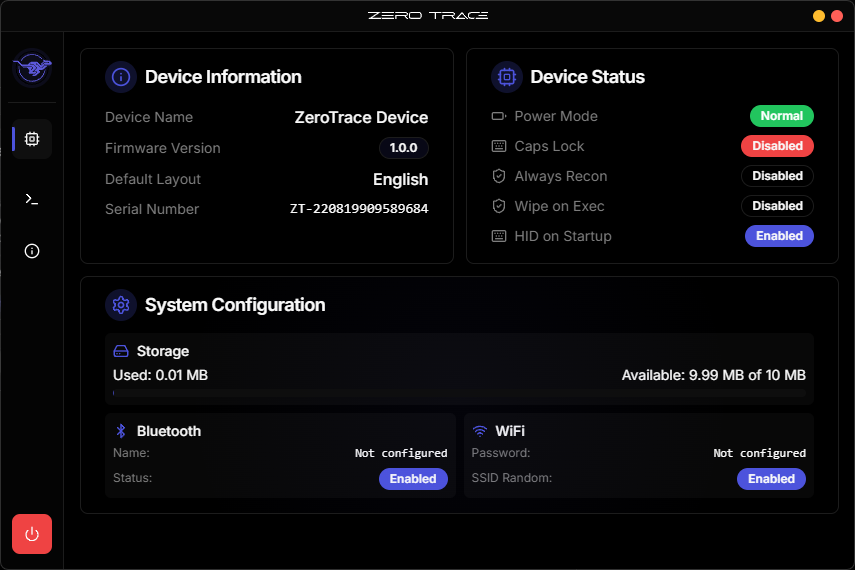
HID is now driven from the ZeroTrace mobile app over Bluetooth. The desktop Companion no longer supports HID devices (it now focuses on BLELogger), and the device no longer hosts an on-board web UI. This page is kept for reference. To flash HID firmware, use the browser-based Web Flasher.
The Companion app was the cross-platform desktop wrapper for serial-port management, device pairing, firmware updates, terminal access, and live status. For HID, those roles have moved: control to the mobile app, flashing to the Web Flasher.
Download
| OS | File | Size | Requirements |
|---|---|---|---|
| Windows | Windows release | ~11.5 MB | Windows 10 or later (64-bit) |
| macOS | macOS release | ~5 MB | Intel & Apple Silicon |
| Linux | Linux release | ~10 MB | Tested Ubuntu 20.04+ (64-bit) |
Source and release notes: github.com/ZeroTracePW/desktop.
Install
- Download the Windows installer from the link above.
- Run the installer; SmartScreen warning is normal, click More info → Run anyway.
- Launch from the Start menu.
- CH343 USB-Serial driver is bundled.
Connect
- Plug the device's COM port into your computer with a USB-C data cable.
- Open the Companion app.
- Pick the device's serial port from the dropdown, click Connect.
The dashboard populates with firmware version, storage, and connectivity. Use the Terminal tab for direct CLI access.
Troubleshooting
| Symptom | Fix |
|---|---|
| Device not detected | Cable is charge-only, swap for a data cable. Confirm you're on COM, not USB. |
| Port busy / permission denied | Another process is holding the port (Web Flasher, another terminal). Close it. |
| Linux: no port listed | dmesg | tail should show the device. If not, replug. If yes, you're not in dialout, log out and back in after usermod. |
| Firmware update stuck | Don't unplug. ESP32-S3 flashing takes ~2 minutes; only retry if it sits idle for >5 minutes. |
The Companion app is also the Dashboard wrapper, a separate distribution at github.com/ZeroTracePW/zerotrace-dashboard-app brings the live dashboard.zerotrace.pw into a native shell for licensing, downloads, and policy usage.